Xuất hiện những cảnh báo sau đây:
Warning [2] Undefined array key "avatartype" - Line: 783 - File: global.php PHP 8.1.33 (Linux)
File Line Function
/global.php 783 errorHandler->error
/printthread.php 16 require_once
Warning [2] Undefined array key "avatartype" - Line: 783 - File: global.php PHP 8.1.33 (Linux)
File Line Function
/global.php 783 errorHandler->error
/printthread.php 16 require_once
Warning [2] Undefined array key 2 - Line: 89 - File: inc/plugins/phptpl.php PHP 8.1.33 (Linux)
File Line Function
/inc/plugins/phptpl.php 89 errorHandler->error
[PHP]   {closure}
/inc/plugins/phptpl.php 109 preg_replace_callback_array
/inc/plugins/phptpl.php(70) : eval()'d code 19 phptpl_parsetpl
/global.php 844 phptpl_templates->get
/printthread.php 16 require_once
Warning [2] Undefined array key 2 - Line: 89 - File: inc/plugins/phptpl.php PHP 8.1.33 (Linux)
File Line Function
/inc/plugins/phptpl.php 89 errorHandler->error
[PHP]   {closure}
/inc/plugins/phptpl.php 109 preg_replace_callback_array
/inc/plugins/phptpl.php(70) : eval()'d code 19 phptpl_parsetpl
/global.php 844 phptpl_templates->get
/printthread.php 16 require_once
Warning [2] Undefined variable $awaitingusers - Line: 102 - File: global.php(844) : eval()'d code PHP 8.1.33 (Linux)
File Line Function
/global.php(844) : eval()'d code 102 errorHandler->error
/global.php 844 eval
/printthread.php 16 require_once
Warning [2] Undefined array key "style" - Line: 909 - File: global.php PHP 8.1.33 (Linux)
File Line Function
/global.php 909 errorHandler->error
/printthread.php 16 require_once
Warning [2] Undefined property: MyLanguage::$lang_select_default - Line: 5024 - File: inc/functions.php PHP 8.1.33 (Linux)
File Line Function
/inc/functions.php 5024 errorHandler->error
/global.php 909 build_theme_select
/printthread.php 16 require_once
Warning [2] Undefined array key "additionalgroups" - Line: 7162 - File: inc/functions.php PHP 8.1.33 (Linux)
File Line Function
/inc/functions.php 7162 errorHandler->error
/inc/functions.php 5044 is_member
/global.php 909 build_theme_select
/printthread.php 16 require_once
Warning [2] Undefined array key "additionalgroups" - Line: 7162 - File: inc/functions.php PHP 8.1.33 (Linux)
File Line Function
/inc/functions.php 7162 errorHandler->error
/inc/functions.php 5044 is_member
/global.php 909 build_theme_select
/printthread.php 16 require_once
Warning [2] Undefined array key "avatar" - Line: 80 - File: global.php(938) : eval()'d code PHP 8.1.33 (Linux)
File Line Function
/global.php(938) : eval()'d code 80 errorHandler->error
/global.php 938 eval
/printthread.php 16 require_once
Warning [2] Undefined array key "pms_unread" - Line: 99 - File: global.php(938) : eval()'d code PHP 8.1.33 (Linux)
File Line Function
/global.php(938) : eval()'d code 99 errorHandler->error
/global.php 938 eval
/printthread.php 16 require_once
Warning [2] Undefined array key "logoutkey" - Line: 101 - File: global.php(938) : eval()'d code PHP 8.1.33 (Linux)
File Line Function
/global.php(938) : eval()'d code 101 errorHandler->error
/global.php 938 eval
/printthread.php 16 require_once
Warning [2] Undefined array key "showimages" - Line: 160 - File: printthread.php PHP 8.1.33 (Linux)
File Line Function
/printthread.php 160 errorHandler->error
Warning [2] Undefined array key "showvideos" - Line: 165 - File: printthread.php PHP 8.1.33 (Linux)
File Line Function
/printthread.php 165 errorHandler->error


F@rum_Haiquan.info (*_*)
Chia sẻ Đặt mật khẩu, password cho file Excel - Bản rút gọn

+- F@rum_Haiquan.info (*_*) (http://haiquan.info/F@rum)
+-- Diễn đàn: TIN HỌC- CÔNG NGHỆ (http://haiquan.info/F@rum/forumdisplay.php?fid=101)
+--- Diễn đàn: THẾ GIỚI IT (http://haiquan.info/F@rum/forumdisplay.php?fid=136)
+---- Diễn đàn: CNTT (http://haiquan.info/F@rum/forumdisplay.php?fid=44)
+---- Chủ đề: Chia sẻ Đặt mật khẩu, password cho file Excel (/showthread.php?tid=2052)


Đặt mật khẩu, password cho file Excel - ngocvu1403 - 03-12-2014

Bạn thường dùng bảng tính Excel để lưu trữ những thông tin quan trọng và bạn không muốn người khác xâm phạm. Và trong Excel cũng hỗ trợ người dùng thiết lập mật khẩu để bảo vệ tập tin Excel của mình. Bạn đã biết cách làm này chưa?


Đặt mật khẩu cho file Excel giúp bạn bảo mật các tài liệu, dữ liệu quan trọng tránh bị người khác vô tình đọc được. Bài viết dưới đây Taimienphi.vn sẽ hướng dẫn các bạn đặt mật khẩu cho file Excel trực tiếp trên ứng dụng soạn thảo văn bản Microsoft Office Excel, cùng theo dõi nhé.


Cách đặt mật khẩu cho file Excel
1. Microsoft Office Excel 2003
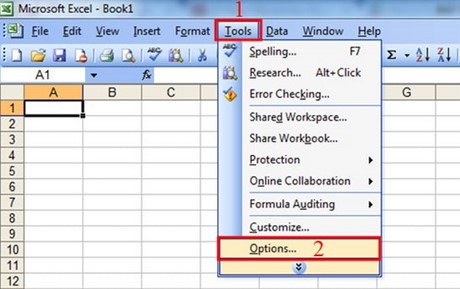
Bước 1: Mở file Excel bạn cần đặt mật khẩu chọn: (1)Tools và (2) Options
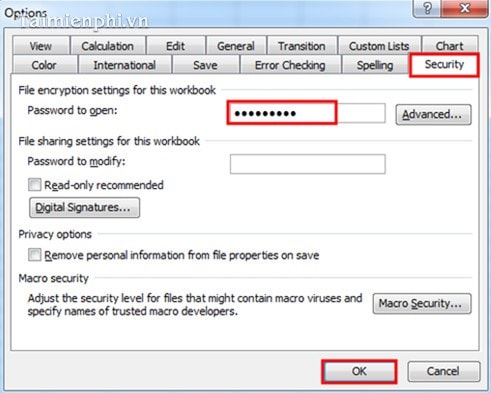
Bước 2: Xuất hiện hộp thoại Options: Chọn vào thẻ Security
Nhập mật khẩu bạn muốn đặt vào ô Password to Open. Sau đó nhấn nút OK.
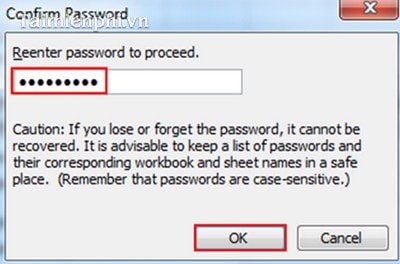
Bước 3: Sau khi nhấn OK sẽ xuất hiện hộp thoại Confirm Password
- Bạn nhập lại mật khẩu một lần nữa để khẳng định Password mà bạn đã chọn rồi bấm OK để hoàn tất.
2. Microsoft Office Excel 2007
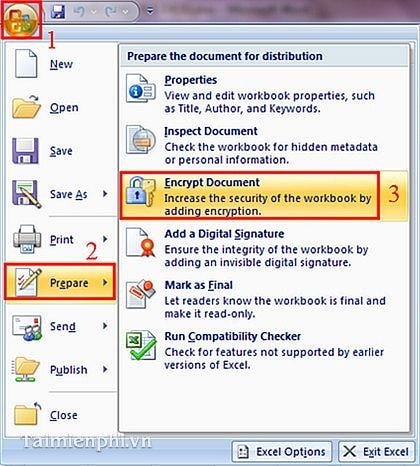
Bước 1: Mở file Excel bạn cần đặt mật khẩu : (1) Chọn Office Button, (2)Prepare và (3)Encrypt Document
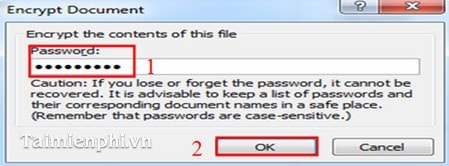
Bước 2: Xuất hiện hộp thoại Encrypt Document
(1) Nhập mật khẩu bạn muốn đặt vào ô Password
(2) Nhấp OK.
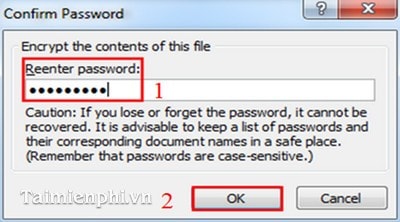
Bước 3: Xuất hiện hộp thoại Confirm Password
(1) Nhập lại mật khẩu một lần nữa để xác nhận.
(2) Nhấp OK
3. Microsoft Office Excel 2010
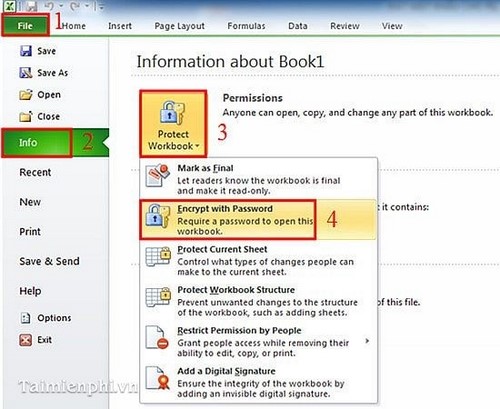
Bước 1: Mở file excel bạn cần đặt mật khẩu chọn: (1)File, (2)Info, (3)Protect Workbook và (4)Encrypt with Password.
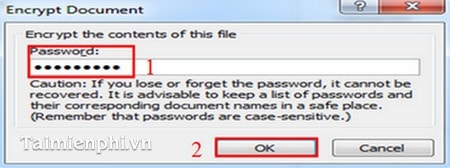
Bước 2: Xuất hiện hộp thoại Options: Chọn vào thẻ Security
Nhập mật khẩu bạn muốn đặt vào ô Password to Open. Sau đó nhấn nút OK.
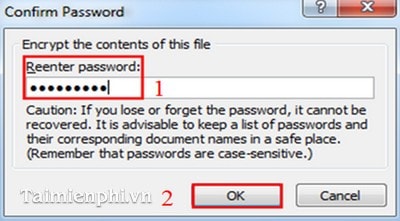
Bước 3: Xuất hiện hộp thoại Confirm Password
(1) Nhập lại mật khẩu một lần nữa để xác nhận.
(2) Nhấp OK.
Các bạn thực hiện tương tự đối với Office 2013.
Trong khuôn khổ bài viết trên chúng tôi đã hướng dẫn các bạn cách đặt mật khẩu bảo vệ file Excel chỉ với các bước khá đơn giản trên, bạn dễ dàng thiết lập password cho các file Excel trên các phiên bản Office 2003, 2007, 2010, 2013. Nhờ đó mọi dữ liệu Excel trên máy tính được bảo mật tuyệt đối.
 

Theo Taimienphi.vn